
Export a ChatGPT Conversation to Word Without Losing Formatting
Quick answer: Paste one reply into the free converter for an editable DOCX. Use Stashkin in desktop Chrome to export a conversation or selected messages. Review table cells and supported equations in Word before sharing.
Paste a ChatGPT reply, download a Word file
Paste one reply into the free converter for an editable DOCX. Use Stashkin in desktop Chrome to export a conversation or selected messages. Review table cells and supported equations in Word before sharing.
Save one ChatGPT reply as an editable Word document
Copy the completed reply
Use the copy button under the answer. Keep Markdown headings, lists and table syntax when available.
Paste and download the DOCX
Paste into the converter on this page and download the Word file. It converts only the supplied text, including supported LaTeX; it does not retrieve the rest of the chat.
Check the file in Word
Edit a table cell and a formula, then undo. Compare headings, code and page breaks with the original. The paste converter does not include images; use the extension for a conversation with images.
Choose one reply or a whole conversation
For a short reply, direct paste into Word may be enough. If table syntax becomes plain text, use the converter. For a whole chat or selected messages, use Stashkin’s Word export and review complex equations after download.
Export a conversation with Stashkin
- 1
Add Stashkin to Chrome
Install it from the Chrome Web Store. No account needed.
- 2
Open the conversation and click the Stashkin icon
Choose the whole chat, replies only or selected messages. You can also export one reply. Check the selected scope before downloading.
- 3
Choose Word
The DOCX downloads, ready to edit in Word, Google Docs, LibreOffice or Pages.

Download an export sample
A real ChatGPT reply with a summary, a table, a chart, an equation and a numbered list, exported with Stashkin using “ChatGPT replies only”. Download the files and see the result for yourself.
In Word, the table and the equation stay editable, and the chart sits where ChatGPT put it.
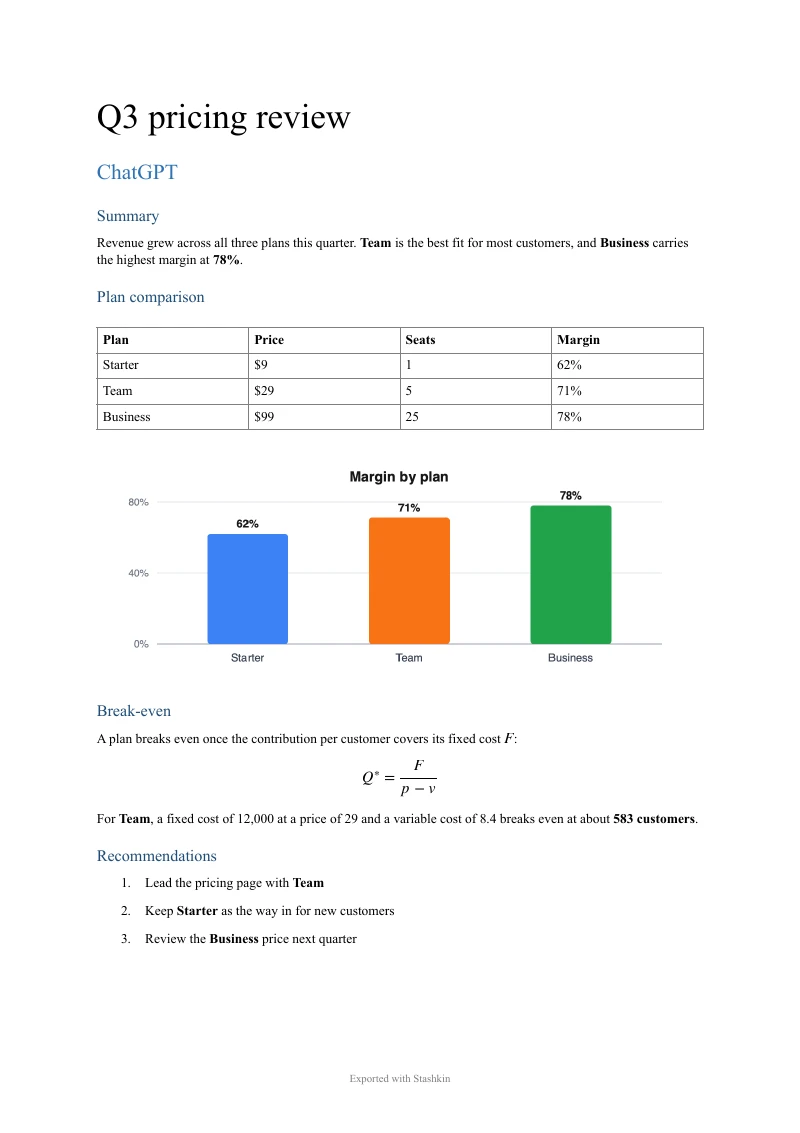
What is preserved
Headings as Word heading styles, so the navigation pane and a table of contents work
Paragraphs, bold and italic text, bulleted and numbered lists
Tables as native Word tables you can resize and edit
Code blocks in a monospace Code style, one paragraph per line
Supported formulas as editable Word equations
Images embedded in the document, scaled to the page width
Hyperlinks, kept clickable
Block quotes and horizontal rules
The conversation title as the document title
Frequently asked questions
Edit a table cell and a formula, then undo. Compare headings, code and page breaks with the original. The paste converter does not include images; use the extension for a conversation with images. How formulas come through
Yes. A table ChatGPT wrote becomes a native Word table with a header row, which you can sort, resize or paste into Excel.
For a short reply, direct paste into Word may be enough. If table syntax becomes plain text, use the converter. For a whole chat or selected messages, use Stashkin’s Word export and review complex equations after download.
Yes. Upload the DOCX to Google Drive and open it with Google Docs, or use File, Open in an existing document. Headings, tables and images carry over.
Yes. Click the Export button beside any reply and choose Word; only that reply is written to the document.
More export guides
Try it on your next chat
Made for students, researchers and professionals who live in ChatGPT.
 Add to Chrome