
How to Save and Print a ChatGPT Conversation as a PDF
Quick answer: Use Chrome’s print dialog to save a conversation as PDF or print it. Review the preview for missing messages and page breaks. Stashkin can export the whole chat, replies only or selected messages without the surrounding interface.
Save or print a ChatGPT conversation as PDF
Open and check the conversation
Wait for the reply to finish. Scroll through the chat and confirm the first and last messages you need are present.
Open Print and choose Save as PDF
In desktop Chrome, press Ctrl+P on Windows or Command+P on Mac. Choose Save as PDF, or choose your printer for paper output.
Review the preview and save
Check all pages, wide tables and code blocks. Adjust paper size, orientation, margins or scale. Save and reopen the PDF to check the result.
Fix missing messages and clipped content
If replies are missing, close print preview, load that part of the chat and try again. Use landscape or a smaller scale for wide tables. For a conversation-only document, export PDF with Stashkin and inspect the first and last messages before printing.
Export a conversation with Stashkin
- 1
Add Stashkin to Chrome
Install it from the Chrome Web Store. No account needed.
- 2
Open the conversation and click the Stashkin icon
Choose the whole chat, replies only or selected messages. You can also export one reply. Check the selected scope before downloading.
- 3
Choose PDF
The PDF downloads, named after the conversation and ready for any PDF viewer.

Download an export sample
A real ChatGPT reply with a summary, a table, a chart, an equation and a numbered list, exported with Stashkin using “ChatGPT replies only”. Download the files and see the result for yourself.
The PDF keeps the table, chart and equation on one clean page.
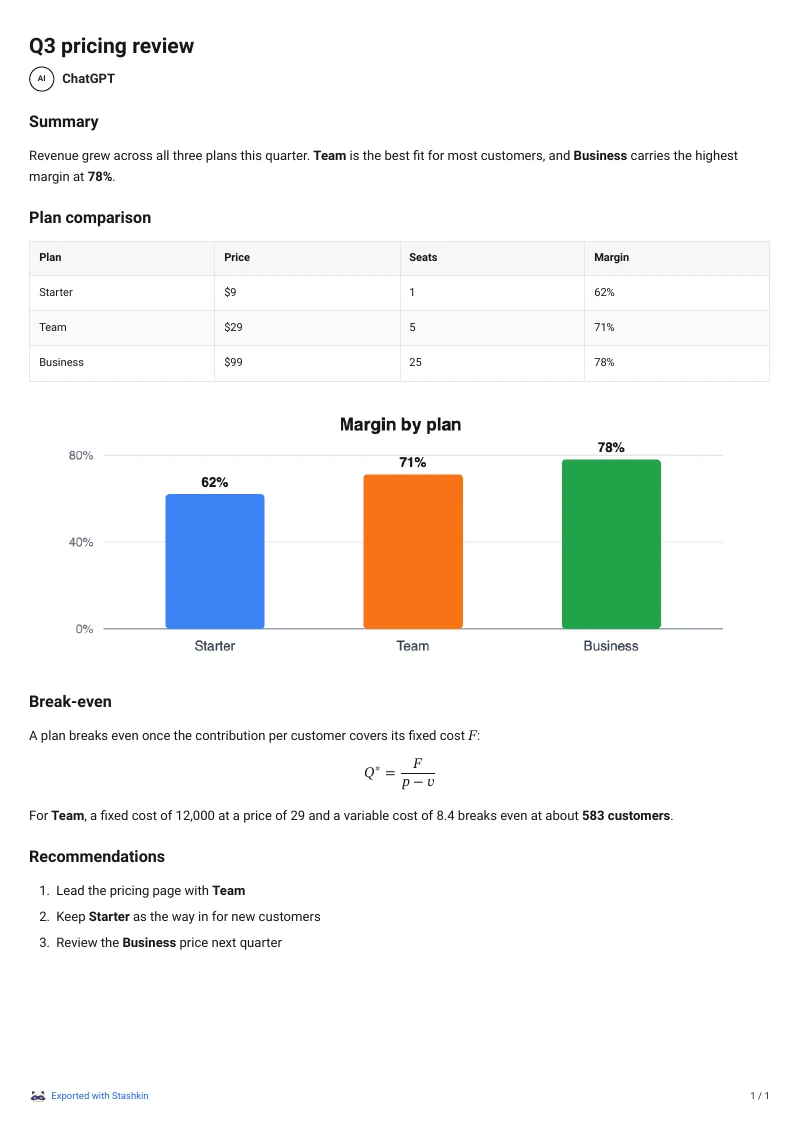
What is preserved
The conversation title, the date and a link back to the original conversation at the top
Headings, paragraphs, lists and block quotes
Tables, laid out as tables
Code blocks with syntax highlighting and their language
Formulas, typeset from the LaTeX ChatGPT wrote
Images, embedded at page width
Clickable links
Emoji, drawn as they appear in ChatGPT
A4 or Letter page size, from Settings
Frequently asked questions
In desktop Chrome, press Ctrl+P on Windows or Command+P on Mac. Choose Save as PDF, or choose your printer for paper output. Check all pages, wide tables and code blocks. Adjust paper size, orientation, margins or scale. Save and reopen the PDF to check the result.
In desktop Chrome, press Ctrl+P on Windows or Command+P on Mac. Choose Save as PDF, or choose your printer for paper output. Check all pages, wide tables and code blocks. Adjust paper size, orientation, margins or scale. Save and reopen the PDF to check the result.
Yes. Images ChatGPT generated and images you uploaded are embedded in the PDF at page width.
Rendered. Inline and display formulas are typeset in the PDF the way ChatGPT shows them, not left as raw dollar-sign LaTeX.
Yes. Every reply gets an Export button beside its copy button; choose PDF there and only that reply is saved.
More export guides
Try it on your next chat
Made for students, researchers and professionals who live in ChatGPT.
 Add to Chrome